Updating Lines and Totals
← Updating Game Results Contents Viewing and Printing Data →
WinPicks Reference Manual Section 6. Updating Lines and Totals
All members of the WinPicks family store the line (point spread and totals line) for every game in the database. In WinPicks 2.0 this information arrives from the odds feed on its own, and every line carries the actual money odds beside it, per bookmaker. This section describes what is shown, and what became of the line files the original program had you maintain.
This section covers the following topics:
- 6.1 - Entering Lines
- 6.2 - Copying Lines from a Folder
- 6.3 - Activating a Lines File
- The Price Basis
- Odds Compare
- Injury Report
Entering Lines
In WinPicks 2.0 you no longer enter lines. They arrive from the odds feed, for every sport, and they arrive with the actual prices attached. This section describes what is now shown and where.
Why it changed. The same reason scores are no longer keyed in: one database serves every customer, so one customer's edit would move everybody's numbers. It is also no longer necessary. The original program had you type a line off a newspaper or a screen once a week; WinPicks 2.0 reads a feed that carries the current number for every unplayed game, and for a played game it carries what the number actually was.
The line and the total. These appear wherever they did before - on the Predict screens, on the Platinum Page, in Team History and in the Analyze results. The line is quoted from the home team's point of view, so a negative number means the home team is favoured, exactly as it always was.
The price. This is new. A line of -3 does not tell you what the bet paid; -3 at -105 and -3 at -120 are different bets. WinPicks 2.0 shows the price beside the line on the Predict grids and on the Platinum Page, in the form -110 / -110 - the favourite's price first, then the underdog's.
A dash in a Price column means no book posted that market on that game. It does not mean the price was even money. The program will not invent a number it does not have.
An asterisk beside a price means the figure did not come from your chosen price basis, but from the consensus of the other books quoting the game. A footnote under the grid says so. See The Price Basis, later in this section.
Seeing every book. Click the green + at the left of any Predict row, or "+ all books" on the Platinum Page, to open every bookmaker pricing that game, one row per book and one column per market. The same information in a fuller layout is on the Odds Compare screen, described later in this section.
The Line Shifter still works as described in section 8.17. It shifts a line for the purpose of asking "what would this formula have done at a different number", and it changes nothing in the database.
Copying Lines from a Folder
This feature has been retired. It existed so that a lines file emailed to you, or downloaded from a bulletin board, could be copied into the program's data folder and picked up. WinPicks 2.0 has no data folder on your machine and reads its lines from the odds feed automatically.
Nothing is lost by its absence: the lines it used to import are the lines the program now collects on its own, for every sport, several times a day.
Activating a Lines File
The original program let you keep several lines files and choose which one was active - one from an early-week number, one from a closing number, one typed from a particular sportsbook.
WinPicks 2.0 replaces this with the Price Basis, which is both simpler and considerably more precise: instead of choosing a file, you choose whose prices you want to be shown and graded at - the consensus of the market, the best available number, or one named bookmaker. It is set once, it applies to every screen, and it is saved to your account rather than the machine you are sitting at.
See The Price Basis, the next section.
The Price Basis
Every price in WinPicks 2.0 comes from somewhere, and this setting is where you say from where. The DATABASE menu carries it as one item whose label always names the basis currently in force - PRICES: BEST AVAILABLE, PRICES: CONSENSUS, or the name of your chosen book. Choose the item and the Prices dialog opens. Figure 6.15 shows it over the Platinum Page, the kind of screen its choice governs.
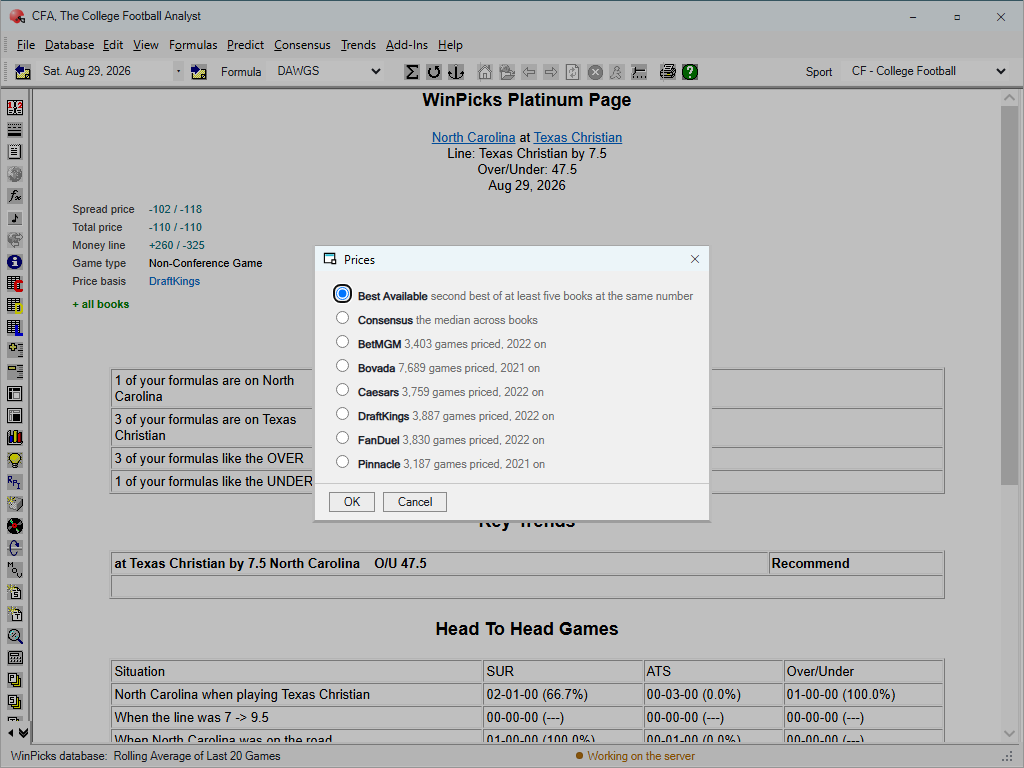
Figure 6.15 - The Prices Dialog, over the Platinum Page (CFA)
Reading the dialog. It is one radio list. The first two rows are the market-wide bases, each with its definition printed beside it in the dialog's own words:
- Best Available - "second best of at least five books at the same number". What line shopping is realistically worth: never the single best price, because the single best is often one stale or unbettable book.
- Consensus - "the median across books". The conservative reading, and the number nobody can call flattering.
Below them, every bookmaker whose price archive covers the sport you are in, each with the size of its archive: the number of games it has priced and the season its records begin. The list is per sport - in Figure 6.15, College Football offers BetMGM (3,403 games priced, 2022 on), Bovada (7,689 games, 2021 on), Caesars, DraftKings, FanDuel, and Pinnacle. Those counts are not decoration; they are the answer to "is this book's archive deep enough to grade against?" A book with two seasons of prices can grade two seasons of picks and no more - the count and the starting season tell you exactly what you would be standing on.
Pick a row and press OK - or Cancel to leave the basis as it was. The change is confirmed in words that say precisely what just happened; the message ends the same way whichever basis you chose, and it is worth memorising: the picks do not change; only what they paid does. The basis never alters what the formula recommends - it alters the prices those recommendations are graded at.
Choosing a named book turns every Net Units figure into what an account at that book would actually have paid. Where that book did not price a game, the figure falls back to the consensus of the books that did, and every report says how many games that was - see Coverage, below. The Platinum Page's Price basis line (visible behind the dialog in Figure 6.15) always names the basis in force, so a page graded at DraftKings says so.
Best Available is the default, and the argument for it is worth stating. Grading at the consensus shows you a record worse than the one you would have got, because anyone betting seriously holds more than one account and takes the better number. On college football that gap is larger than the entire per-bet edge of a starter formula. Understating a record is no more honest than overstating it. But if in practice you bet one book without shopping, choose that book here, and let the records tell you the truth about the habit.
Underneath, prices are kept per bookmaker - one archive per book per sport - and the screens read them wherever an individual quote matters: the green + on the Predict grids, "+ all books" on the Platinum Page, and the whole Odds Compare screen. The Prices dialog is where one of those archives is promoted to the grading standard.
It applies everywhere, and it applies to Analyze. This is the important part. The basis does not just change what is displayed - it changes the price the engine grades at, so the record a formula posts is the record it would have posted at those prices. There is one resolver for the whole program, which is what stops the tuner and the Analyze screen ever disagreeing about the same bet.
It is yours. The basis is saved to your account, not to the machine, so it follows you between computers and is not affected by what anyone else chooses.
Coverage. No basis prices every game. Where the basis in force has no price for a game, the figure shown is the consensus of the books that did quote it, marked with an asterisk and explained in a footnote beneath the grid. It is never silently passed off as the basis's own price.
Odds Compare
Odds Compare answers one question: who is pricing this game, and at what? Choose Add-Ins > Odds Compare. The screen is shown in Figure 6.20.
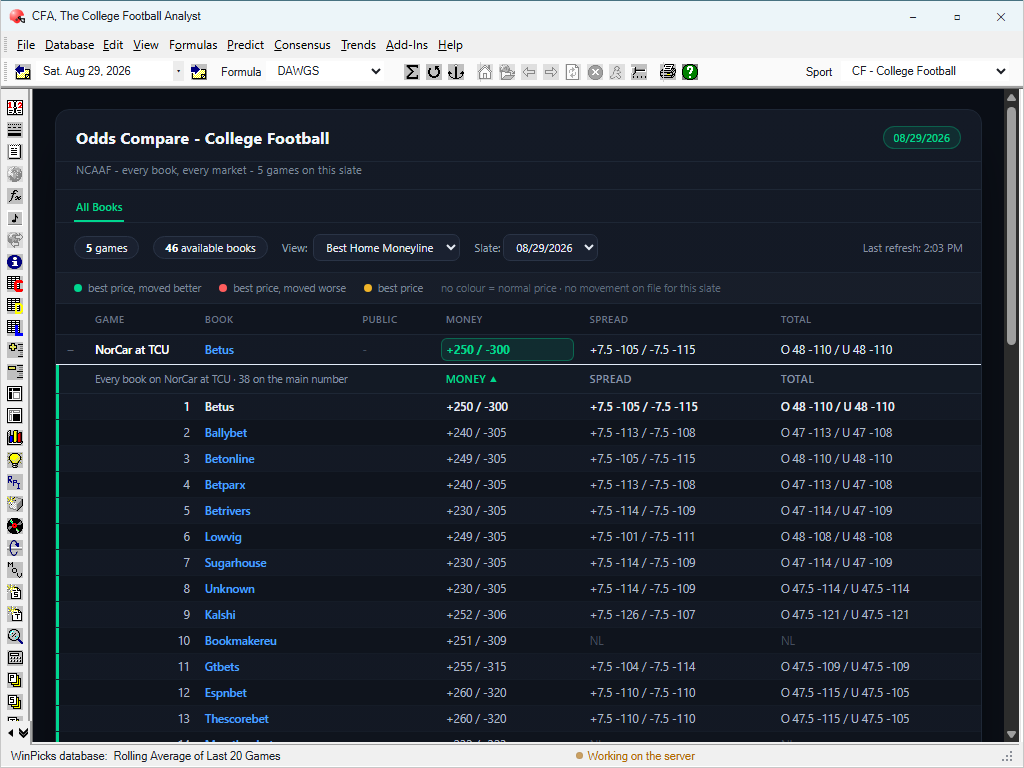
Figure 6.20 - The Odds Compare Screen (CFA)
Reading Figure 6.20 from the top:
- The header names the sport and carries the date on a pill at the right. Under it, one line states the scope: every book, every market, and how many games are on this slate.
- The counters state the size of what you are looking at - in the figure, 5 games and 46 available books.
- The VIEW list chooses what the board's summary rows lead with - Best Home Moneyline in the figure - and the SLATE list picks the date. LAST REFRESH, at the right, is when these numbers were last collected.
- The legend explains the colours, which describe execution - what you would actually get - not results: best price, moved better means the number improved since it opened; best price, moved worse means it is still the best on the board but was better earlier; best price alone means no movement is on file for this slate. No colour is an ordinary price.
- The board has a row per game, with columns GAME, BOOK, PUBLIC, MONEY, SPREAD and TOTAL: the best book for the chosen view, its money line (favourite / underdog), its spread with the price on each side, and the total the same way. The best number is boxed in the legend's colour.
Click a game and it opens into every bookmaker quoting it - the figure's game opens into 38 books on the main number. Each book is a row; MONEY, SPREAD and TOTAL are columns; click a column heading to re-rank by it. NL means that book has not posted the market. This is where a quarter-point of spread or fifteen cents of price - the difference between two books on the same game - stops being invisible.
What it is not. It is not a betting screen and nothing is placed from it. It is also the one screen that never shows a consensus row, because its whole purpose is to show each book's own quote; a consensus line among them would be inventing a bookmaker.
Played games. Odds Compare works on games that have finished as well as games that have not. On a played game it shows what the books actually offered, which is how you check whether a closing number moved against you.
Where the public stands. Opening a game also shows the public betting split for each market, as two bars: the share of bets on each side, and the share of the money. The two disagreeing is the signal worth reading - 59% of the tickets on one side and 40% of the money means a lot of small bets one way and the size going the other - and the screen says so in words whenever the gap reaches ten points. Below that the two measures routinely differ by a point or two on sample size alone, and the screen says that too. Where the split was not recorded for a market, the panel says why instead of showing nothing.
Reading one game properly. Take the expanded game in Figure 6.20 and read it the way the screen is meant to be read. The money line runs from +230/-305 at the tightest book to +250/-300 at the best - on a hundred-unit underdog bet, that spread of quotes is twenty units of payout for the identical opinion. The spread is 7.5 everywhere, but its prices run from -101 to -126 a side: the number agrees, the cost of betting it does not. And the totals disagree about the number itself - 47, 47.5 and 48 across the board. That half point is not decoration: a game landing exactly on 47 or 48 pushes at one book and loses at another. Every edge this program can find is of the same order of magnitude as what this one panel shows you lying on the table.
The three signals together. Each column answers a different question, and they compose. The best price answers "where do I get the most for this opinion". The movement colour answers "am I early or late": a green best price improved since it opened - the market moved toward you, and you are getting a better number than the openers did; a red best price is still the best available, but the market has been eating it - you are late, and the next move is likelier against you. The public split answers "who is on the other side": when the money disagrees with the tickets, the side with fewer, bigger bets is the side the books respect. None of these is a pick. Together they tell you whether the number in front of you is likely to be the best number you will see - which is a thing your formula cannot know, because it reads results, not the room.
Closing-line discipline. Section 8's Tuning Against Closing Line Value explains why beating the close is the most reliable short-sample sign of a real edge. Odds Compare is where that discipline is practised by hand: the screen works on played games too, so after the close you can open the game you bet and see what the number did after you took it. A better number is worth real money: in our own testing each point of line value converts to roughly three to four points of win rate. What beating the close does not do is grade your handicapping. We tested that too, and a formula that beats the close is not thereby a formula that makes money out of sample. Use this screen to check the number you took, not to score your judgement. A bettor who checks this screen after every bet learns more in a season than a bettor who only checks the scores.
Shopping is not grading. This screen shows every book so you can take the best number; the Price Basis (section 6) decides which prices your records are graded at. Keep the two jobs separate in your head: shop here, grade there. Best Available grading assumes you shop - roughly what this screen makes possible - while Consensus grading assumes you took the middle of the market. If in truth you bet one book without shopping, the Prices dialog will grade at that book's own archive; choose honestly, and let the records tell you the truth about the habit.
Injury Report
The professional sports publish injury designations, and WinPicks reads them. There are two places to see them.
The full report. Select INJURY REPORT from the ADD-INS menu. The window lists every designated player for the next date that has games - a mid-week report is accurate and useless, so the program walks forward to a game day - with the designation and when it was set. A team with nobody listed says so, rather than leaving a blank that could mean anything.
Who is out, on the game. On the Predict screens and the Platinum Page, opening a game's price panel also prints the players who are OUT for each side, underneath the prices. Only OUT: twenty-five questionable names on a price panel would bury the one that decides the bet. The full list, with each designation's history, is the report above.
College Football Analyst and College Basketball Analyst have neither. The NCAA mandates no injury report, so there is nothing to read, and the program shows nothing rather than an empty list that would read as "nobody is hurt".
← Updating Game Results Contents Viewing and Printing Data →