Updating Game Results
WinPicks Reference Manual Section 5. Updating Game Results
While the season is in progress, the database keeps itself updated: new game results arrive on their own, usually within a few minutes of a game going final. This section describes the screens that once did that work by hand, and what each of them shows now.
This section covers the following topics:
- 5.1 - Keying in Data
- 5.2 - Adding Postseason Games
- 5.3 - Downloading Files from the Internet
Keying in Data
In WinPicks 2.0 you no longer key in results. Scores arrive automatically, usually within a few minutes of a game going final, and the database every customer sees is the same one. This section describes what you can still do, which is look at any of it.
Why it changed. The original program kept its database on your own machine, so if a score was wrong you fixed it yourself. WinPicks 2.0 keeps one database on the server for everybody. An edit made by one customer would change the numbers every other customer sees, so score entry is not offered. The screens that used to enter data now show it.
Viewing a game's box score. Choose File > Game Scores, pick a date on the calendar and select a game. Pro Football Analyst shows the full box score - first downs, rushing and passing yards, turnovers, penalties, time of possession and the rest of the twenty categories. The other four packages show the score, the line and the total; their leagues' box scores are not part of the WinPicks database.
The fields are shown for reading. Nothing on this screen writes to the database.
If you find a mistake. Report it rather than working around it. A wrong score is a bug in the data feed and will be wrong for every customer until it is corrected centrally - and it will then be corrected for everyone at once. Choose Help > My Account and follow the Contact link on your account page.
How good is the data? Every NFL box score from 2000 onward has been checked field by field against an independent source, and the differences corrected - 5,547 of them across 26 seasons. Scores, lines and totals for all five sports are checked continuously against the same feeds that supply them.
Adding Postseason Games
Postseason games are added automatically. When a league announces its bracket, the fixtures appear in the database with their round already set - Wild Card, Divisional, Conference Championship and Super Bowl in Pro Football Analyst; the equivalent rounds in the other four packages.
This matters more than it sounds, because the round is what several screens filter on. A trend restricted to playoff games, or a formula analysed over the regular season only, depends on every postseason game carrying the right code. Those codes are set centrally and are checked: for example, exactly one Super Bowl per season, played at a neutral site, and a playoff field whose size matches the era.
The schedule window itself remains, for browsing: choose File > Schedule, or the toolbar button that used to enter the playoff schedule. The window is shown in Figure 5.20. The calendar on the left picks a date; the list on the right - headed "Games Scheduled (view only)" - shows that date's fixtures with their game types. The ADD, MODIFY, DELETE and SAVE buttons are shown disabled, with the reason on hover: the schedule is season data, the same for every account, so it is shown here but not editable.
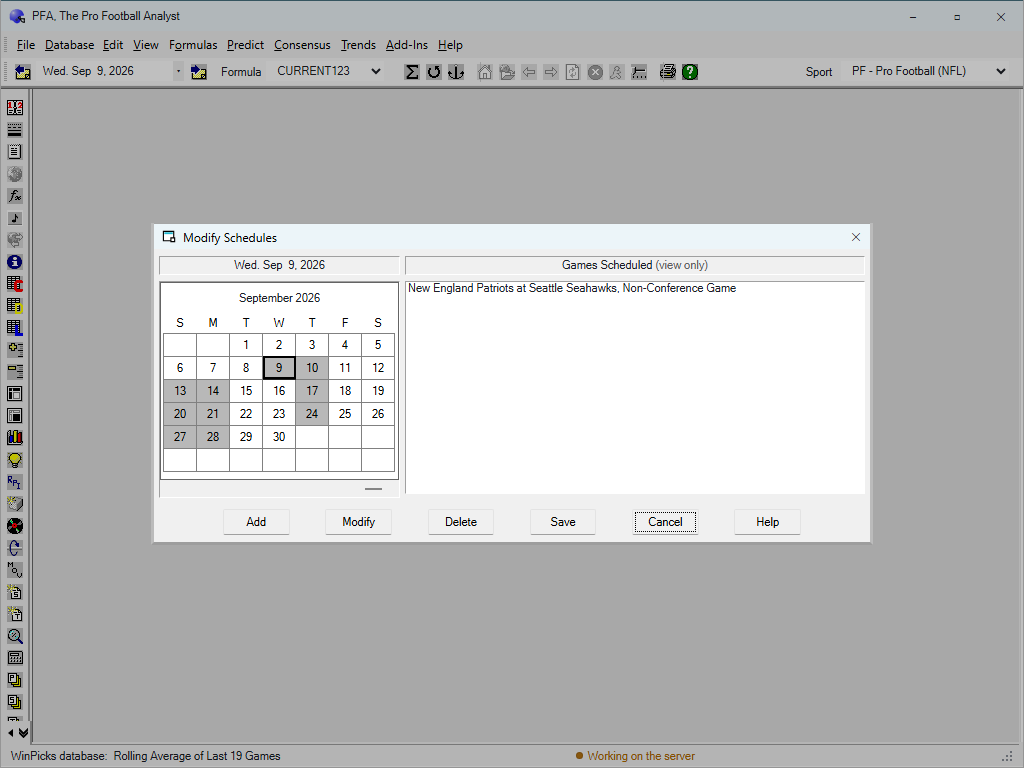
Figure 5.20 - The Schedule Window (PFA)
You do not need to do anything when the postseason starts.
Downloading Files from the Internet
There is nothing to download. The original program fetched stat files from the MicroBrothers site each week and merged them into your local database. WinPicks 2.0 keeps the database on the server, and it is updated continuously:
- Scores are collected as games finish.
- Lines and totals are collected from the odds feed through the day, so an unplayed game shows the current number rather than the one that was there when you last downloaded.
- Schedules are loaded when a league publishes them, including postseason fixtures as they are announced.
- Prices - the actual money odds beside each line - are collected per bookmaker. See section 6, Updating Lines and Totals.
The File > Download Stats from Internet menu item is shown greyed out, with the reason on hover. It has not been removed, because it was in the program for twenty years and its absence would be more confusing than its explanation.
How current is it? The status bar at the bottom of the window shows when the data was last refreshed. If a game finished an hour ago and its score is not showing, that is worth reporting; everything else on the screen updates without any action from you.