Trend Query Command Examples
WinPicks Reference Manual Appendix C. Trend Query Command Examples
The Trend Finder's command box (section 9) takes either flags or plain English. Whatever you type, the box is rewritten with the flags it understood, so you can always see - and correct - the interpretation. Nothing you type is ever sent to a shell: the text is parsed in the page against a fixed list of flags, and words it cannot place are listed back to you rather than ignored. The reference for everything below lives in the program itself, under Help > Trend Command Reference (Figure C.1). This appendix walks through it, example by example.
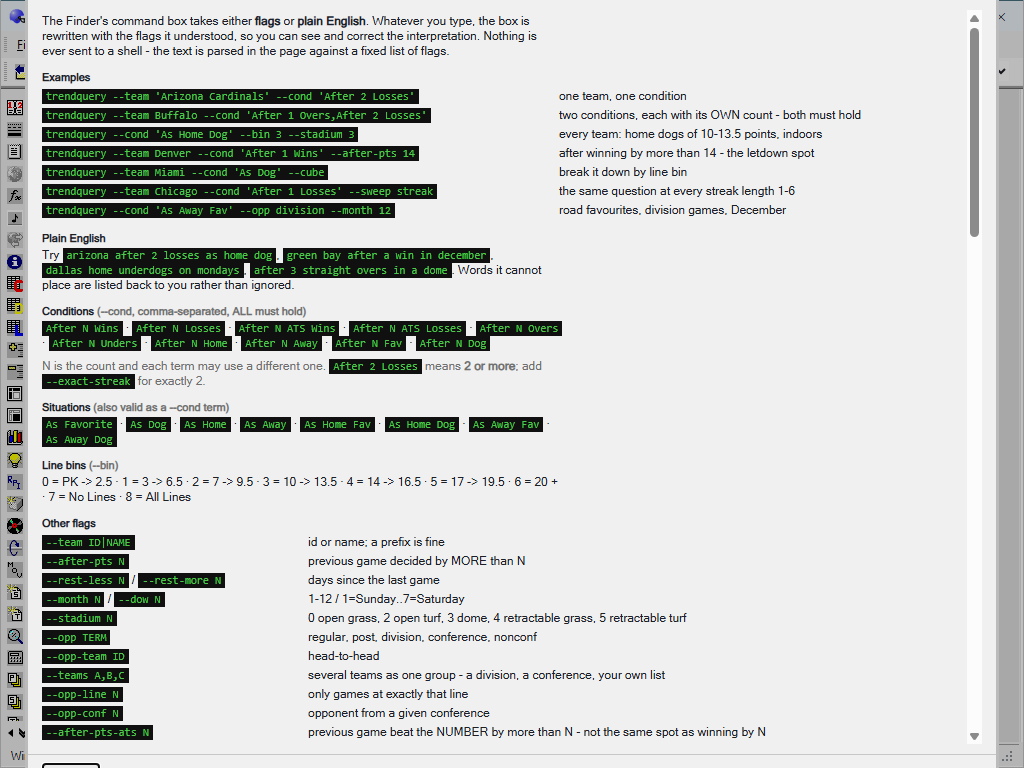
Figure C.1 - The Trend Command Reference (PFA)
The general shape of a query is:
trendquery --team WHO --cond 'WHAT HAPPENED' ...more filters...Every part is optional. No team means every team; no condition means every game. The answer always comes back as the nine-situation grid described in section 9, with the same columns.
One team, one condition.
trendquery --team 'Arizona Cardinals' --cond 'After 2 Losses'The simplest question: one team, after two or more straight losses. Quote a name that contains spaces; a prefix is fine (--team Ariz works), and so is a team id. After 2 Losses means two or more - add --exact-streak for exactly two. Section 9's Figure 9.37 shows a question of this shape answered in full, column by column.
Two conditions, each with its own count.
trendquery --team Buffalo --cond 'After 1 Overs,After 2 Losses'Conditions are comma-separated inside one --cond, and ALL of them must hold: Buffalo's previous game went over the total, and Buffalo has lost two or more straight. Each term carries its own N - the 1 and the 2 are independent.
Every team, a line bracket, a stadium type.
trendquery --cond 'As Home Dog' --bin 3 --stadium 3No --team, so this is every home underdog in the database - narrowed to --bin 3, spreads of 10 to 13.5 points, indoors (--stadium 3 is a dome). The pro football bin ladder runs: 0 is pick-em to 2.5, 1 is 3 to 6.5, 2 is 7 to 9.5, 3 is 10 to 13.5, 4 is 14 to 16.5, 5 is 17 to 19.5, 6 is 20 and up, 7 is games with no line, 8 is all lines. Stadium codes: 0 open grass, 2 open turf, 3 dome, 4 retractable grass, 5 retractable turf.
The letdown spot.
trendquery --team Denver --cond 'After 1 Wins' --after-pts 14--after-pts 14 keeps only games where the previous game was decided by MORE than 14 points - here, Denver coming off a blowout win. Two sharper variants exist: --after-pts-ats N asks whether the previous game beat the number by more than N (not the same spot as winning by N), and --after-pts-ou N asks whether the previous total missed the posted number by more than N.
Break the answer down by line size.
trendquery --team Miami --cond 'As Dog' --cube--cube runs the same question once per line bin and returns a block per bracket, so you can see whether Miami as a small dog and Miami as a big dog are the same fact or two different ones.
The same question at every streak length.
trendquery --team Chicago --cond 'After 1 Losses' --sweep streak--sweep streak re-runs the query at streak lengths 1 through 6. An edge that grows smoothly with the streak is a different thing from one that appears only at exactly 3 - the first looks like a fact about the team, the second like noise that got lucky once.
Several filters at once.
trendquery --cond 'As Away Fav' --opp division --month 12Road favourites, in division games, in December. --opp takes regular, post, division, conference or nonconf; --month is 1-12 and --dow is 1 for Sunday through 7 for Saturday.
Plain English. All of the above can be typed as words: arizona after 2 losses as home dog, green bay after a win in december, dallas home underdogs on mondays, after 3 straight overs in a dome. The box rewrites what it understood into flags - which is also the fastest way to learn the flags.
The rest of the vocabulary. The conditions are After N Wins / Losses / ATS Wins / ATS Losses / Overs / Unders / Home / Away / Fav / Dog, and any situation (As Home Dog, As Away Fav, and so on) is also valid as a --cond term. The remaining flags:
| Flag | What it does |
|---|---|
| --team ID or NAME | one team; a prefix is fine |
| --teams A,B,C | several teams as one group - a division, a conference, your own list |
| --opp-team ID | head-to-head against one opponent |
| --opp-conf N | opponent from a given conference |
| --opp-line N | only games at exactly that line |
| --rest-less N / --rest-more N | days since the last game |
| --wind-more N / --wind-less N | wind at kickoff, mph (domes neutralised, retractables excluded) |
| --temp-more N / --temp-less N | temperature at kickoff |
| --gust-more N / --precip | gusts, mph / rain or snow fell |
| --stat DIR:NAME | previous game beat or lost to the opponent on a stat |
| --having EXPR | keep only result rows matching a condition |
Filtering the answer rather than the games. --having reads the result:
trendquery --cond 'As Home Dog' --having 'games >= 50 and ats.z > 2'keeps only rows with fifty or more games and an ATS z-score above two. The fields are games, or bet.metric, where bet is su, ats or ou and the metric is w l t n pct units z dd run - so ats.units > 20 and ats.dd < 12 finds systems that made money without a brutal ride. Join terms with and and or (and binds tighter; there are no parentheses), and the screen reports how many rows it kept of how many tested.
Previous-game stats (Pro Football Analyst only). --stat more:TotalYds,fewer:Turnovers keeps games where the team beat its previous opponent on total yards while committing fewer turnovers - relative to the opponent, not an absolute threshold, and a tie counts as neither. A caution the reference itself prints: measured league-wide, no single stat predicts next-game ATS, so these are for combining with other filters - and the sample collapses fast when you do. Read the game count before the percentage.
Asking the question backwards. Typing scan instead of trendquery runs the reverse search - the Trend Seeker's question: given this scope, which combinations are strongest? Because it tries everything, multiple testing is the whole problem, so a scan always reports how many combinations it tested and how many chance alone would have thrown up. Its flags: --min-games (volume floor), --min-z (significance floor), --min-units (profit floor at -110), --rank z|units|pct, --top N, and --situations / --bins / --pairs to widen the space. The one that matters most is --split MM/DD/YYYY: rank on games before the date, then report what held up after it, judged in units. The reference's own measured example is worth repeating: ranked by units with a 150-game floor and split at 2014, two of twelve winners held up - and seven of the twelve were one fact, the Manning-era Denver overs, wearing different labels, which reversed from +30.4 units to -37.3. Treat an un-split scan as a hypothesis, never a finding.
Three scenarios, start to finish.
Find me a fade. A system does not have to win to be useful - a filter that loses reliably is a filter whose other side wins, minus the vig. Hunt for one directly by filtering the result for deep losers with volume behind them:
trendquery --cond 'As Away Fav' --having 'games >= 100 and ats.units < -20'Any row that comes back lost twenty or more units over at least a hundred games. Before betting the opposite of anything, apply the full audit: the vs rest column (a loser that merely tracks its unfiltered baseline is the era losing, not the filter), and the same holdout discipline as any positive system - a fade saved to My Systems is graded out of sample like everything else.
How do these two teams actually play each other? Head-to-head is easiest asked in plain words - type
denver vs kansas cityand the box rewrites it to the flag form (--team and --opp-team, with the teams' ids filled in - the --opp-team flag itself takes an id, which is why you let the plain-English pass supply it). The nine-situation grid then reads as the history of one rivalry - Denver at home against this opponent, Denver as the dog against this opponent, and so on. This is the same information the Platinum Page's head-to-head method summarises (section 8), with the full honesty columns attached.
A season-scoped question. The from and to dates above the grid scope every query, typed or clicked - set them to one season's bounds and the command box asks its questions inside that season. Narrower time slices are flags: --month 12 for Decembers across all seasons, --dow 2 for Mondays. Keep the golden rule in view as the window narrows: G first, verdicts second. One season of one team's Decembers is a handful of games, and the grid will happily show you a 4-0 that means nothing.
When the box talks back. The command box never guesses silently:
- Words it cannot place are listed back to you, unparsed, rather than dropped - if you typed
arizona after 2 loses, the stray word comes back and the streak filter was not applied. - A
--havingfilter reports how many rows it kept of how many tested, so an empty grid is distinguishable from an over-tight filter. - A weather flag with no weather data synced for the range is refused outright - never quietly answered from nothing.
- Names with spaces need quotes (
--team 'Green Bay'); a unique prefix needs none (--team Greenis ambiguous,--team Denvis not). - And the box always rewrites itself with what it understood - when in doubt, read the rewritten line before pressing Find. That line is the question that was asked.
Working with an assistant. The Copy for LLM button beside the command box copies three things as one block of text: your question, the full result grid, and the complete flag vocabulary. Paste that into any assistant you use and ask it, in your own words, for the query you actually want - "same thing but only December, and require fifty games" - and it can answer with a command, because the vocabulary travelled with the question. Paste the command back into the box. The box rewrites it into the flags it understood, exactly as it does with your own typing, so the assistant gets no power you do not have: whatever comes back is parsed against the same fixed list of flags, in the page, and shown to you before it runs.